⚡ The Incident
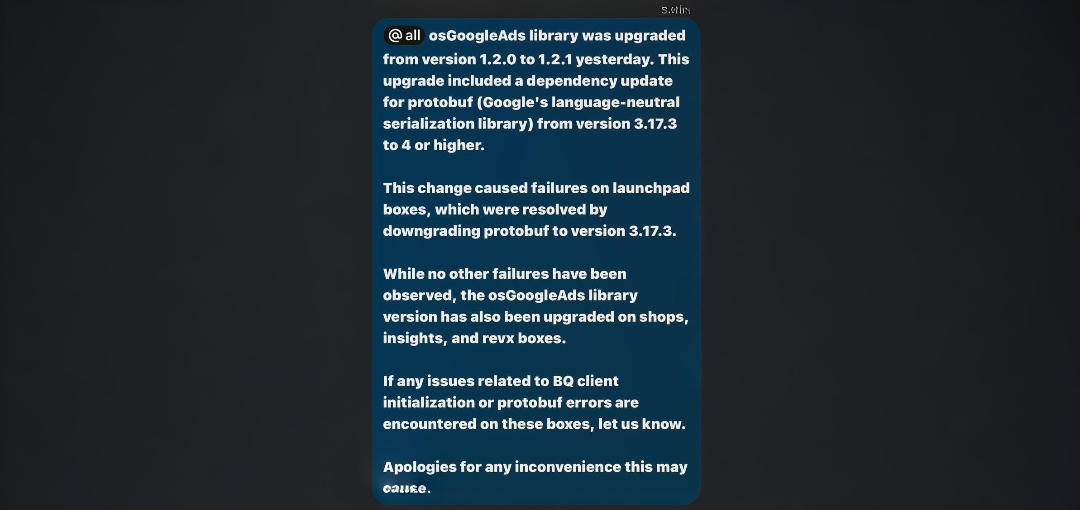 I was running code on a shared client system where everything was installed globally due to infrastructure constraints (no Docker, no virtual environments, no Conda).
I had:
protobuf==3.17.3Then I installed:
pip install google-ads==25.1.0What happened?
Installing collected packages: protobuf
  Attempting uninstall: protobuf
    Found existing installation: protobuf 3.17.3
    Uninstalling protobuf-3.17.3:
      Successfully uninstalled protobuf-3.17.3
Successfully installed protobuf-5.29.4
Boom. Production code relying on protobuf==3.17.x started failing.
🤔 How Did This Happen?
Python’s pip is designed to resolve dependencies lazily. It will happily uninstall one version of a package and install another to satisfy the needs of a newly added package, even if it breaks something else.
In my case, google-ads==25.1.0 required:
protobuf>=4.25.0,<6.0.0
So it upgraded protobuf to 5.29.4, breaking my older code.
📄 How Dependency Management Works in Python
Python does not isolate dependencies by default. Unless you’re using tools like:
- Docker: Isolated containers per app (see GroundPlay setup for Docker examples)
- Conda environments: Project-level Python environments
- venv + pip: Built-in virtual environment and installer combo
You’re essentially operating on the same shared space, where any change can break everything.
Why You Should Use Docker / Conda / venv:
- Different apps can use different versions of the same package
- You can roll back broken installs
- You can test before deployment safely
❌ What I Did Wrong
- Installed globally on a shared machine
- Did not check which dependencies
google-ads==25.1.0would pull in - Did not simulate the install first
- No backup of previous working state
✅ What You Should Do Instead
1. Simulate with --dry-run
Check what will happen before installing:
pip install --dry-run google-ads==25.1.02. Check Dependencies with pipdeptree
Install it:
pip install pipdeptreeUse it:
pipdeptree --warnSee what’s depending on what, and where conflicts could arise.
3. Backup Before Changing
pip freeze > requirements-backup.txtRestore later with:
pip install -r requirements-backup.txt4. Use pip check After Installation
To ensure nothing’s broken:
pip check🤖 Why Does pip Allow This?
Because Python has no built-in dependency isolation. pip doesn’t know if you’re using protobuf for one script or twenty. It just tries to satisfy the latest install request.
This is why professional-grade setups always involve isolation tools like Docker, Conda, or venv.
😜 Final Words
To quote the ancient Linux proverb:
If you’re using Linux and tired of Python dependency hell, just uninstall Python. That’ll solve all your problems.
(Joking. Please don’t. Your system probably depends on it. Like… the whole OS.)
Stay safe. Use dry runs. Use isolation. And never trust a fresh pip install in prod.
Related: GroundPlay setup shows proper Docker isolation practices for production applications.